Recommend on google

Recommend this page on GOOGLE
Follow me on twitter here..
Like Us on Facebook

Search this blog

Showing posts with label facebook. Show all posts

Tuesday, August 13

Chat on Facebook without getting detected.

Recently Facebook made a change in its chat system and it enables the other user to know that you have seen their message.


Now you see what I mean. A sad thing, Facebook does not allow you to turn this feature off manually, but luckily the browsers today have extensions that can alter the way your browser works.

Step 1.>
Go to this website.

Step 2.>
Depending upon the browser you are using Firefox / Chrome, you will be prompted to install the extension that will then allow you to chat undetected.


Step 3.>

Congratulations, you just went incognito... ;- )

Yes, that's it. You are done. Now suppose I have installed the plugin on my Computer and my friend replies to the chat. Here is an actual screenshot from my friend's computer.


You see, my friend cannot see if I have seen the message or not...catching my rift..?? ;)

Friday, January 25

Download all photos from a facebook album

Do you like to download all photos from a Facebook album? What do you do...save every image one by one...??
Well this could be a method if a album contains 15-20 images but what about a case when a album has many photos, lets say 100...and you just somehow want all these photos on your hard disk..??

Here's a way to do so...and the best part is that it can be any album, yours, your friend's or any Facebook page as well...lets go..!!

Step 1.>
Open www.picknzip.com . Click on login at the top. It will ask to connect with your Facebook account and you may give the necessary permissions.


Step 2.>
Select the name of your friend or any group or any page that you have liked to download the photos from it. This list can be found on the left side of the page.
To download your own photos, click on the green button that says 'find my photos and videos'. After a while all your albums will appear in front of you.


Step 3.>
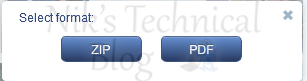
Select any album that you wish to download and you will be prompted with an option to download in a 'zip' format or 'pdf' format. I personally recommend the zip format but its up to you.


Step 4.>
Once you select the option, watch the magic happening... ;)


Step 5.>
The process completes depending on the number of photos in the album you have selected. The website now prompts you to save the file to a location on your hard disk. Chose any convenient location and you are good to go..


I hope this post helped you someway or the other...share your opinions/problems in the comments below..

Tuesday, October 23

3 passwords in facebook

What does the post title suggest to you? Can you set 3 different passwords for facebook or are you allowed to change your password 3 times within a week or something like that...??

NO!!
By the post title I mean that your Facebook profile has 3 passwords by default and you can use any of them to login...and facebook will get you through... ; - )

Now, you might be wondering how can a single account have 3 passwords...??

To understand this let us suppose that the original password of your facebook account is:- 'geeksRuLe'
I am considering the capital and small cases as well.

Now have a look at this image


Yes, these are your 3 passwords

Password 1:- your original password

Password 2:- your password with the small cases with only the first letter in capitals.

Password 3:- your password with all the cases toggled (i.e:- capitals are now small and the smalls are now capitals)

You can try this trick on your own account and facebook will let you in with these 3 variations.. :-D

The logic behind this is that some smartphones have auto capitalization of the 1st letter, which gives password 2.
Suppose you have the caps lock key ON and you type your password holding the shift key, this will result in entry of the password in toggled cases than your original password...and hence Password 3.

Smart Facebook!!...isn't it..??

Thursday, December 15

Facebook Timeline now available for everyone

Facebook's timeline a new way to present your profile has gone live today and is available to all the regular users around the world. But you need to opt in to apply for the new features.

You can get the Facebook timeline from the official page. Click the 'get it now' button and you will be redirected to a page that will view your timeline profile. Once enabled you need to setup everything. The profile is available for 7 days after which it will go live to all the audience around the world. In these 7 days you can tinker with the design and choose which posts to display and which ones to hide.
If you are satisfied by the changes you can PUBLISH the profile right now and it will be public.

There are several new features with the Facebook timeline.
  • Earlier you could hide or delete your status updates. Now you can even highlight the updates you would like other people to notice.
  • You profile now contains a profile cover apart from the profile picture. This can be used to express your style/mood/professional front.
  • You will find a feature 'Activity Log' on your timeline profile. This log shows all your activities done by you ever since you were born on Facebook. So you might want to hide some of them.
  • There are several new rules like who can post to your timeline and who cant and so its worth reviewing your profile before hitting the publish button.
At last I would like to conclude that Facebook has kept your privacy settings intact but its never a bad option to go through the options once again.

Try the Facebook timeline now..personally I find it the best Facebook product till date.

Here's a preview of my profile after applying the update. :)


Monday, November 28

Return Visit-Aware

Return visit aware: the future of networking knows what you have consumed.
Personally I don't know how many people have noticed this return visit functionality of Facebook.

We all remember Facebook had two tab earlier. 'Most Recent' & 'Top News' stream.
Users who used to login once in a day preferred the top news stream whereas returning users viewed the most recent stream to get the latest updates from their friends and colleagues.

The new layout of Facebook has come out with a great solution regarding this problem.
If you haven't noticed it yet, try it now..

Importance: Facebook had been struggling earlier since most of the users didn't see the two tabs at top and found Facebook to be stale, causing them to leave the site or simply navigated away.
So returning users find new content on the site, which undoubtedly increases traffic on Facebook.
This is what I get on returning to Facebook..


Smart move Facebook as it solved all these problems by aligning its interface with natural human habits.  (deserved the blue Facebook color)

Sunday, September 18

Subscribe button on Facebook

Did you notice the subscribe button facebook recently? Seems similar to 'follow' from twitter and 'add to circles' from google+. Facebook is trying to keep up with the changing trend and allows you to follow strangers and view their public updates.

Facebook is trying to give Twitter a run for its money with a new feature that will allow users to “subscribe” to others’ public updates—essentially the Facebook version of a Twitter “follow.”
On its official blog, Facebook explained that the new feature will give users greater control over their news feeds, allowing them to see updates from specific friends, pick what kinds of updates they see (for instance, just photos from one friend or only important updates from another), and choose the frequency of updates.
But the big change is that users will now be able to subscribe to the public feeds of people they’re not “friends” with as well as send their own public messages, just like on Twitter. This means that you’ll be able to see stories from journalists, artists, or any other stranger without needing to send a friend request.
The feature will be rolling out over the next few days, and according to Facebook, soon you’ll begin seeing “subscribe” buttons on friends’ and strangers’ profiles.


So next you know, you are subscribing to your crushes may be.. ;)

Saturday, August 20

Update facebook status via twitter

Did you know that it is possible to have Twitter automatically update your Facebook page? It’s actually very simple. In fact, I haven’t manually updated my Facebook status in months.

twitter logo with arrow pointing to facebook pages
To get this process working, follow these six simple steps. It wouldn’t take more than five minutes. These instructions assume that you already have both Facebook and Twitter account.

  • Make sure you are logged onto Facebook. Now go to the Facebook’s Twitter application page. Now click on the Go to Application button. It looks like this: how-to-update-your-facebook-status-wiith-twitter-01.jpg


    1. The application will now ask you to confirm that Twitter can access your Facebook information. Click on the Allow button. how-to-update-your-facebook-status-wiith-twitter-02
    2. Now log into your Twitter account by entering your Twitter username and password. The screen looks similar to this: how-to-update-your-facebook-status-wiith-twitter-03
      Click on the Login button.
    3. You can now actually use Twitter from within Facebook. The screen looks like this: how-to-update-your-facebook-status-wiith-twitter-04
      Personally, I never use this. I want the reverse of this. I want to update my Facebook status from Twitter. Therefore, click on the Allow Twitter to Update Your Facebook Status button in the upper-right of the screen.
    4. You should get a confirmation screen that looks similar to this: how-to-update-your-facebook-status-wiith-twitter-05
      Now confirm that you are willing to let Twitter update your Facebook status by clicking the Allow Status Updates button.
    5. After you click this button, you will go to the Twitter application. Don’t Twitter anything from here. Instead, go to your Facebook Home page, by clicking the Home link on the Facebook menu. Now you can test the connection by going to your favorite Twitter application or the Twitter web page and entering a tweet. Wait a minute or two and go back to your Facebook home page and refreshing it. Your most recent tweet should be displayed as your Facebook status. This is how my status looked:


      That’s all there is to it. Now every time you Twitter something, your Facebook status will be automatically updated.

      IMPORTANT: If you don’t want to send every one of your tweets to Facebook, then check out Selective Twitter Status. It allows you to designate the tweets you want to appear on Facebook by end a tweet with the #fb “hashtag” in your post. Only those tweets with the hash tag at the end will be posted on Facebook.
    Related Posts Plugin for WordPress, Blogger...